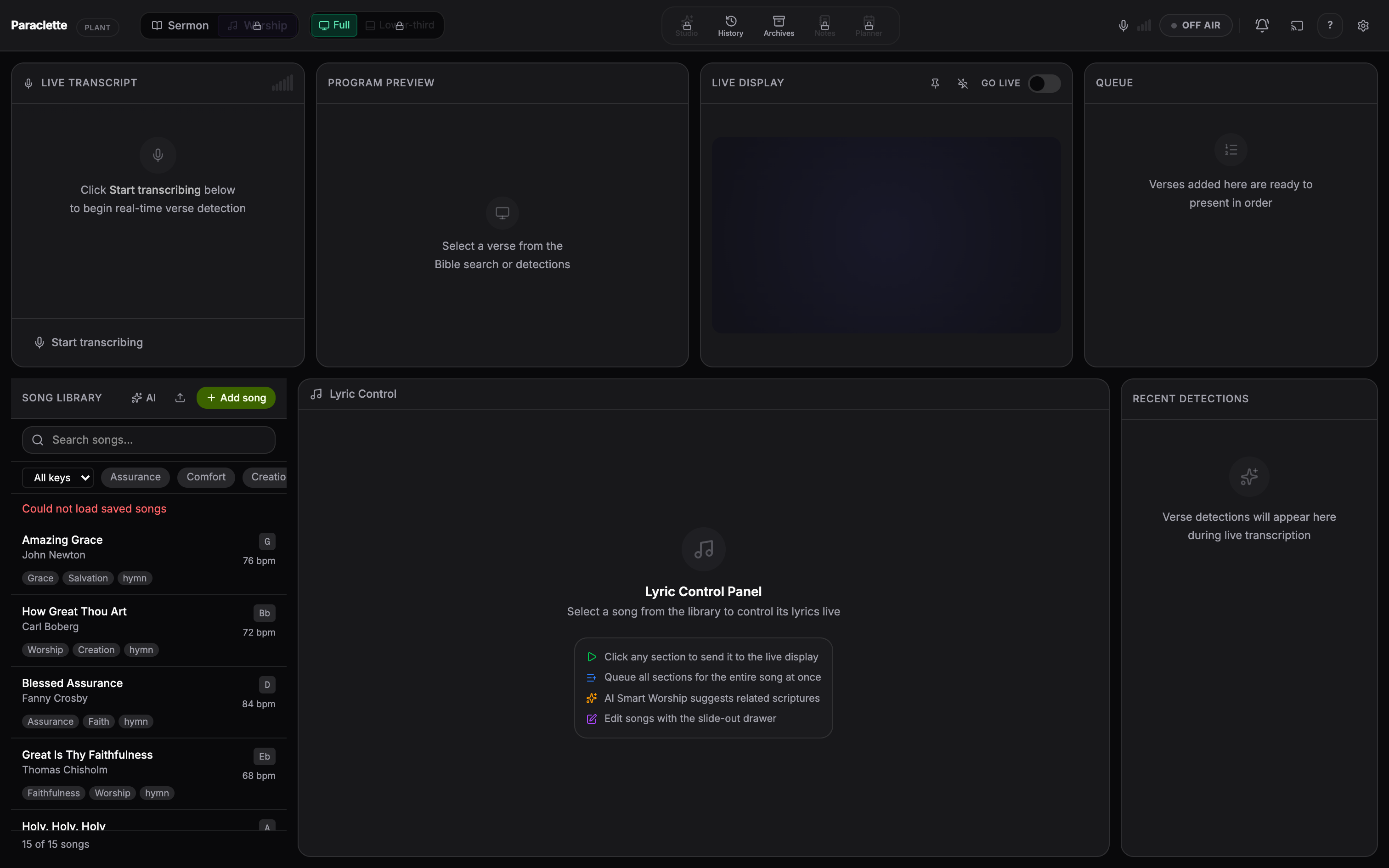
Flip the mode toggle to Worship and the dashboard re-tools itself for song and lyric presentation.
The Song Library and Lyric Control panels in Worship Mode.
What Worship Mode gives you
Song & Hymnal Library — search your songs by title, lyric, or tag. Add new songs, edit them, and organise with tags.
Lyric Control — step through verses, choruses, and bridges slide-by-slide with ←→. Authored line breaks are preserved on the broadcast screen.
Import existing libraries — bring songs over from your previous presentation software, including EasyWorship libraries.
AI song parsing — paste raw lyrics and let Paraclette structure them into proper sections automatically.
Running a song
Find the songSearch the Song Library by title, a line of lyrics, or a tag, and click to load it into Lyric Control.
Step through the sectionsUse ←→ to advance through verses, choruses, and bridges. Each slide goes live as you reach it.
Blackout between songsClear the screen during transitions or prayer without losing your place in the set.
★
Auto-Lyric Sync & Parallel Lyrics (Kingdom). The top tier adds an auto-sync engine that follows the worship leader, plus simultaneous multilingual lyric display for bilingual congregations.
✦
Switching modes never stops a session — you can flip between Sermon and Worship from the mode toggle in the transport bar at any time.